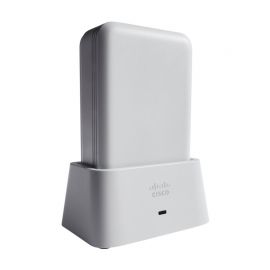
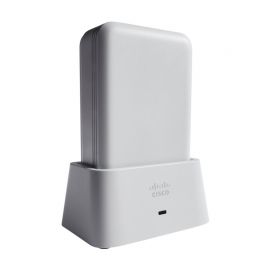
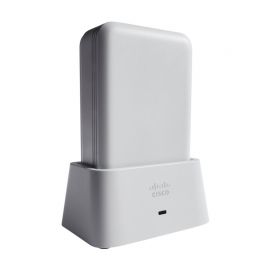
AIR-OEAP1810-H-K9

Call for Price

Call For Price

Availability: In stock

Detail :

802.11ac Wave 2 OfficeExtend AP, H Regulatory Domain

Condition : New Factory Sealed

Models : AIR-OEAP1810-H-K9 - Cisco Aironet 1810 OfficeExtend Access Point

Get A Quote
Category: Brand:

Warranty : Warranty Icon

Shipping : Shipping Icon Fast & Secure

Payments : Payment Methods

Certification : Certifications


AIR-OEAP1810-H-K9 Overview

AIR-OEAP1810-H-K9, providing H Regulatory Domain, is one of the Cisco Aironet 1810 Series OfficeExtend Access Points. The 1810 Series offer a highly secure enterprise wireless and wired connection to the home, micro-branch, or other types of remote sites. The 1810 Series extends the corporate network to teleworkers, mobile workers and even micro-sites. The access points connect to the home or site broadband Internet access and establish a highly secure tunnel to the corporate network. This tunnel allows remote employees access to data, voice, video and cloud services for a mobility experience consistent with that at the corporate office. The 1810 Series supports highly secure access to corporate data and personal connectivity for teleworkers home devices, with segmented home traffic.

Quick Specs

Table 1 shows the quick specs of AIR-OEAP1810-H-K9.

Product Code AIR-OEAP1810-H-K9
Interfaces – 1 10/100/1000BASE-T PoE uplink port

– 1 Management console port (RJ-45)

– 3 10/100/1000BASE-T ports (local Ethernet ports), including 1 PoE out port

– 1 DC power connector

Features 2×2 single-user/multiuser MIMO with two spatial streams

Maximal ratio combining (MRC)

20-, 40- and 80-MHz channels

PHY data rates up to 866.7 Mbps (80 MHz on 5 GHz)

Packet aggregation: A-MPDU (Tx/Rx), A-MSDU (Rx)

802.11 Dynamic Frequency Selection (DFS)

Cyclic shift diversity (CSD) support

Regulatory Domain H (H regulatory domain):

– 2.412 to 2.472 GHz; 13 channels

– 5.150 to 5.350 GHz; 8 channels

– 5.745 to 5.825 GHz; 5 channels

Integrated antennas – 2.4 GHz, gain 2 dBi

– 5 GHz, gain 5 dBi

System – 512 MB DRAM

– 256 MB flash

– 1.4 GHz system dual-core CPU

Dimensions (W x L x H) 165 x 114 x 41 mm (Access point without mounting bracket))
Weight 560g (Access point without mounting bracket or any other accessories)

Product Details

Figure 1 shows the face and left side of AP.

Note:

The Face of AP 48V DC power port
The Left side of AP Kensington lock slot

Figure 2 shows the base of the AP with the ports and connectors.

Note:

Console port LAN port 2
Passive Pass-Through port PSE / LAN port 1
LAN port 3

PSE / LAN port 1 provides 802.3af/at Power Sourcing Equipment (PSE) PoE-Out power on the LAN 1 Ethernet interface. With 802.3at input the PoE-Out is 6.95W (Class 2).With DC input the PoE-Out is 12.95W (Class 0).

Figure 3. Mounting the AP in the Cradle.

Note:

The AP
The cradle kit
Mounting the AP in the Cradle

Cisco Aironet OEAP1810 series access points can be mounted on a table or horizontal surface, using the AIR-OEAP1810-CRD cradle kit. This kit is shipped with the access point as standard and includes a back cover and an RJ-45 jumper cable. It is also separately available from Cisco as a spare.

Figure 4 shows the AIR-OEAP1810-CRD Cradle Views.

Note:

AP Status LED indication when AP is mounted in the cradle LAN 3 port
PSE / LAN 1 port WAN port
LAN 2 port

Compare to Similar Items

Table 2 shows the comparison between two AP.

AIR-OEAP1810-H-K9

AIR-OEAP1810-I-K9

Interfaces – 1 10/100/1000BASE-T PoE uplink port

– 1 Management console port (RJ-45)

– 3 10/100/1000BASE-T ports (local Ethernet ports), including 1 PoE out port

– 1 DC power connector

– 1 10/100/1000BASE-T PoE uplink port

– 1 Management console port (RJ-45)

– 3 10/100/1000BASE-T ports (local Ethernet ports), including 1 PoE out port

– 1 DC power connector

Regulatory Domain H (H regulatory domain):

– 2.412 to 2.472 GHz; 13 channels

– 5.150 to 5.350 GHz; 8 channels

– 5.745 to 5.825 GHz; 5 channels

I (I regulatory domain):

– 2.412 to 2.472 GHz; 13 channels

– 5.180 to 5.320 GHz; 8 channels

Get more information

Do you have any question about the AIR-OEAP1810-H-K9

Contact us now via

Live Chat or orders@netseg.me.
Be the first to review “AIR-OEAP1810-H-K9”

Your email address will not be published. Required fields are marked *

Reviews

There are no reviews yet.

Customer Reviews

(0)
5 stars
4 stars
3 stars
2 stars
1 stars

No reviews yet.

×

Write a Review

AIR-OEAP1810-H-K9 Specification

AIR-OEAP1810-H-K9 Specification

Authentication and security
  • Advanced Encryption Standard (AES) for Wi-Fi Protected Access 2 (WPA2)
  • 802.1X, RADIUS authentication, authorization and accounting (AAA)
  • 802.11i
Software
  • Cisco Unified Wireless Network Software with AireOS Wireless Controllers Release 8.2.111.0 or later
Maximum clients
  • Maximum number of associated wireless clients: 200 per Wi-Fi radio, in total 400 clients per access point
802.11ac
  • 2x2 single-user/multiuser MIMO with two spatial streams
  • Maximal ratio combining (MRC)
  • 20-, 40- and 80-MHz channels
  • PHY data rates up to 866.7 Mbps (80 MHz on 5 GHz)
  • Packet aggregation: A-MPDU (Tx/Rx), A-MSDU (Rx)
  • 802.11 Dynamic Frequency Selection (DFS)
  • Cyclic shift diversity (CSD) support
Ethernet ports
  • Authentication with 802.1X or MAC filtered
  • Dynamic VLAN or per port
  • Traffic locally switched or tunneled back to wireless LAN controller
Bluetooth (future availability)
  • Integrated Bluetooth 4.1 (including BLE) radio
  • Maximum transmit power: 5 dBm
  • Antenna gain: 2 dBi
Maximum number of non-overlapping channels H (H regulatory domain):
  •  2.412 to 2.472 GHz; 13 channels
  •  5.150 to 5.350 GHz; 8 channels
  •  5.745 to 5.825 GHz; 5 channels
Receive sensitivity (combined sensitivity) 802.11ac (non HT80) -88 dBm @ 6 Mbps -70 dBm @ 54 Mbps
Integrated antennas
  • 2.4 GHz, gain 2 dBi
  • 5 GHz, gain 4 dBi
Interfaces
  • One 10/100/1000BASE-T PoE uplink port
  • Management console port (RJ-45)
  • Three 10/100/1000BASE-T ports (local Ethernet ports), including one PoE out port:
PoE out provides 802.3af when access point is powered by Cisco local power supply (AIR-PWR-C=, AIR-PWR-D=), or ~6.5W when powered by 802.3at, or no output when powered by 802.3af
  • One passive pass-through port RJ-45 (back to bottom)
  • DC power connector
Indicators
  • Status LED indicates boot loader status, association status, operating status, boot loader warnings, boot loader errors
  • Per-port status for local Ethernet ports
  • For privacy, LEDs are automatically turned off when the access point joins a controller. LEDs may be enabled to be administratively - see configuration guide.
Dimensions (W x L x H)
  • Access point (without mounting bracket): 6.5 x 4.5 x 1.6 in. (165 x 114 x 41 mm)
Weight
  • Access point without mounting bracket or any other accessories: 1.2 lb (560 g)
Environmental
  • Nonoperating (storage) temperature: -22 to 158F (-30 to 70C)
  • Nonoperating (storage) maximum altitude: 25C, 15,000 ft (4,500m)
  • Operating temperature: 32 to 104F (0 to 40C)
  • Operating humidity: 10% to 90% percent (noncondensing)
  • Operating maximum altitude: 40C, 9843 ft (3,000m)
System
  • 512 MB DRAM
  • 256 MB flash
  • 1.4 GHz system dual-core CPU
Input power requirements
  • 44 to 57V DC
  • Optional power supply and power injector: 100 to 240V AC; 49 to 60 Hz
Powering options
  • 802.3af/at Ethernet switch
  • Optional Cisco power injectors (AIR-PWRINJ5=, AIR-PWRINJ6=)
  • Optional Cisco local power supply (AIR-PWR-C= or AIR-PWR-D=)
Power draw
  • Maximum values: 12.95W (15.4W with 100m of cable) with no PoE out, 20.7W (22W with 100m of cable) with 6.49W PoE out and 27.65W with 12.95W PoE out (when powered using AIR-PWR-C or AIR-PWR-D)
Note: When deployed using PoE, the power draw numbers listed above include the power loss in 100m of cabling on the uplink port and 100m of cabling on the PoE out port.
Physical security
  • Torx security screw, included with the access point
  • Kensington security slot
Mounting
  • Included with the access point: mounting bracket AIR-AP-BRACKET-W2, compatible to install to single gang junction box or multiple international standards
  • Optional:
AIR-AP1810W-KIT=, spacer kit to mount the access point directly on a wall where standard junction boxes are not available AIR-OEAP1810-CRD=, cradle kit to mount the access point on a desk
Accessories
  • Mounting bracket: AIR-AP-BRACKET-W2= (available as spare)
  • Spacer kit: AIR-AP1810W-KIT= (sold separately), includes spacer and RJ-45 jumper cable
  • Cradle kit: AIR-OEAP1810-CRD= (sold separately), includes back cover and RJ-45 jumper cable
  • Physical security kit: AIR-SEC-50= (sold separately), with 50 pcs. security screws used to secure the access point onto wall-mounting bracket, 50 pcs. RJ-45 caps and 2 pcs. unlock keys used to block physical access to Ethernet ports
  • Cisco local power supply: AIR-PWR-D= (sold separately)

Categories