
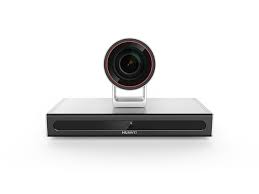

 Fast & Secure




Huawei Cloudlink Box 600 Overview
The CloudLink Box, Huawei’s next-generation ultra-HD video conferencing endpoint, provides a powerful audio and video media processing engine, with an extensive range of audio and video ports. It can be used with a variety of cameras and display devices in meeting rooms of all sizes.
Quick Specs
Table 1 shows the Quick Specs.
|
Product Code |
Huawei Cloudlink Box600 |
|
Components |
Ultra-HD codec, ultra-HD camera (optional), microphone array (optional), CloudLink Touch, cables, and power adapter |
|
Multimedia frame protocols |
ITU-T H.323 and IETF SIP |
|
Video codec protocols |
H.265, H.264 HP, H.264 BP, H.264 SVC, H.263, and H.263+ |
|
Audio codec protocols |
G.711A, G.711U, G.722, G.722.1, G.722.1C, G.729A, AAC-LD, and Opus |
|
Dual-stream protocols |
ITU-T H.239, Binary Floor Control Protocol (BFCP), and data |
|
Other communications protocols |
H.225, H.235, H.241, H.245, H.281, H.350, H.460, RFC2833, LDAP, and LDAPS |
|
Network transmission protocols |
TCP/IP, RTP, RTCP, DHCP, DNS, SMTP, SNMP, SNTP, Telnet, SSH, HTTP, HTTPS, and TR-069 |
Product Details
The Huawei Cloudlink Box600provides these featuresand highlights:
Ultra-HD video
Huawei’s proprietary VME technology, combined with H.265-based encoding and decoding for video and content, delivers a 4K ultra-HD video experience.
Intelligent face detection and backend video processing enhance light adaptability, reduce bandwidth consumption, and improve image definition.
Hi-fi audio
Acoustic Echo Cancellation (AEC), Automatic Noise Suppression (ANS), Automatic Gain Control (AGC), VoiceClear, AudioEnhancer, and lip synchronization Opus,
Forward Error Correction (FEC), Backward Error Correction (BEC), Packet Loss Concealment (PLC), Net Automatic Transfer-Enhancement (netATE), and AudioJitter Buffer (AJB)
Support for cascading of two microphones
Intelligent content sharing
4K ultra-HD content sharing
Wired and wireless presentation
AirPresence is the wireless sharing client developed for CloudLink series endpoints and runs on a laptop or mobile device. Using the AirPresence mobile client, you can share content, place a call, join a meeting, adjust the volume, turn the microphone on or off, and adjust the camera angle. When a participant is sharing content using AirPresence, other participants are still allowed to start sharing, but the existing content sharing session will be dropped. Up to three AirPresence clients can connect to the same endpoint.
Multistream meeting
Multiple terminals can connect to one meeting. With the multistream video capabilities, you can choose to view video of other participants as needed. Fewer resources are consumed and latency is also reduced.
Multiple layouts
Video and content can be displayed on one screen, but in different panes. In a data conference, you can view the composite of the participant video, whiteboard, and shared content.
Three HDMI outputs are available, supporting three screens.
Network adaptability
The Box utilizes Super Error Concealment (SEC), Hybrid Automatic Repeat Request (HARQ), and automatic deceleration to deliver clear and smooth video even when the packet loss rate reaches 30%.
Homegrown core technologies
Secure and reliable, with self-developed software and hardware, including CPU
Core audio and video technologies: audio and video capability enhancement, H.264/H.265/super-resolution technology, QoS network optimization technology, anti-feedback technology, active noise suppression algorithm, and virtual background replacement


Reviews
There are no reviews yet.