


 Fast & Secure




Huawei Switch
Huawei Access Network
Huawei Transmission Network
Learn Details
IP1T7820EU01 Overview
Huawei IP1T7820EU01 IP Phone eSpace 7820 is the next generation 3-line desktop phone using Session Initiation Protocol (SIP). It provides user-friendly interactive liquid crystal display (LCD) interface and easy operation of various features for users.
High-fidelity voice quality with the help of a high-quality handle, speaker and headset
Various function keys for a better user experience, such as soft keys, programmable keys, navigation keys and volume key
Rich features, such as caller name and department presentation, linkage with eSpace Desktop, and PBX features
Automatic upgrade and configuration, and unified management through TR069 by eSpace EMS, simplifying the deployment and maintenance for administrators
Power adapter, PoE
Signaling and media encryption, and Web management pages based on Hypertext Transfer Protocol Secure (HTTPS).
Quick Specs
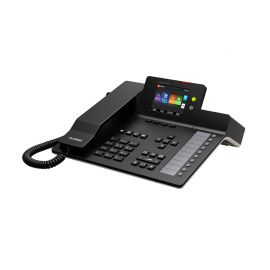
Figure 1 shows the appearance of IP1T7820EU01.
Table 1 shows the Quick Specs.
| Product Code | IP1T7820EU01 |
| Part Number | 02160340 |
| Description | IP Terminal phone eSpace 7820(Europe) |
| Display | 2.87LCD 132×64 pixel |
| Language Display | Chinese Simplified/Chinese Traditional/English/French/German/Italian/Polish/Russian/Portuguese/Spanish/Turkish |
| Protocol | TCP/IP, SIP, SDP, UDP, RTP, RTCP, DHCP, Telnet, DNS, PPPoE, HTTP, HTTPS, SNTP |
| Audio Codec | G.711a/G.711/G.729AB/G.722/ iLBC/G.723.1/G.726 |
| DTMF | Inband/RFC2833/SIP Info/Auto+SIP Info |
| Lines | 3 lines |
| Line buttons | 3 |
| Softkeys | 4 |
| PoE(802.3af) | |
| Ethernet Port | 2 x 10/100Mbps |
| Net Dimension(D*W*H mm) | 209*188*150 |
| Pack Dimension(D*W*H mm) | 275*220*105 |
| Power Consumption (maxW) |
2.6 |
| Weight (approx.kg) | 0.77 |
| Pack Weight(kg) | 1.28 |
| Pack Volume(m^3) | 0.006353 |
Product Details
Figure 2 shows the front panel of IP1T7820EU01.
Note:
| Power Indication LED | Line Key | ||
| Soft Key | Message | ||
| Headset | Transfer | ||
| Redial | Speaker | ||
| Navigation Key | Volume Adjustment Bar | ||
| Digital Key |
Table 2 shows eSpace 7820 keys and indicators.
| Key and Indicator | Description
|
| Power Indication LED | This indicator indicates the power supply status.
When eSpace 7820 is powered on, the indicator is on. When eSpace 7820 is powered off, the indicator is off. When eSpace 7820 has an incoming call or when it is muted during a call, the indicator blinks. |
| Line Key
|
Line keys indicate the status of the two accounts. You can set line keys to Direct Station Selection (DSS) keys for other use. |
| Soft Key | The phone screen displays function names of the four soft keys. For example, soft keys are marked as History, Directory, DND, and Menu on the standby screen. |
| Message
|
Blinks when you receive a new voice message.
If there is no new voice message, the page for setting voice connection code is displayed after you press this key. If you have set a voice access code, the voice mailbox is accessed after you press this key. |
| Headset
|
On the dialing page or conversation page, press this key to change the conversation mode.
If eSpace 7820 is in the handset mode, press this key to access the headset mode. To restore the handset mode, press this key again. If eSpace 7820 is in the hand-free mode, press this key to access the headset mode. To restore the hand-free mode, press this key again. |
| Transfer | Press this key to transfer a call to another party. |
| Redial
|
In the standby state, press this key to access the page displaying numbers that you have dialed.
Select a record and press this key again to initiate a call. |
| Speaker
|
Answers an incoming call in the hand-free mode. On the dialing page or conversation page, press this key to change the conversation mode. If eSpace 7820 is in the handset mode, press this key to access the hand-free mode. To restore the handset mode, press this key again. If eSpace 7820 is in the headset mode, press this key to access the hand-free mode. To restore the headset mode, press the Headset key. |
| Volume Adjustment Bar
|
Adjusts the receiving volume for the handle, headset, and ring tone, and the receiving volume in the hand-free mode. |
| Navigation Key |
Includes four arrow keys (up, down, left, and right), one OK key, and one X key. Arrow keys: move the cursor on difference pages. OK key: access the menu that is selected or confirm an operation, or answer an incoming call if any. X key: cancel an operation, return to the upper-level menu, reject an incoming call (in the ringing state), or mute a call. |
|
Digital Key |
Enters alphanumeric and special characters. To enter digits, lowercase letters, uppercase letters, and special characters, switch the entering mode. |
Compare to Similar Items
Table 3 shows the comparison of IP1T7810UK01, IP1T7820EU01, IP1T7830EU01 and IP1T7850EU01.
| Product Code |
IP1T7810UK01 |
IP1T7820EU01 |
IP1T7830EU01 |
IP1T7850EU01 |
| Display | 2.74LCD 75×16 pixel, 2x15characters |
2.87LCD 132×64 pixel |
3.24graphic LCD 132x64pixel |
4.09graphic LCD 320×160 pixel |
| Lines | 2 lines | 3 lines | 3 lines | 6 lines |
| Line buttons | 2 | 3 | 3 | 6 |
| Programmable buttons | 0 | 0 | 10 | 10 |
| Softkeys | 0 | 4 | 4 | 4 |
| PoE(802.3af) |
Get more information
Do you have any question about the IP1T7820EU01
Contact us now via
Live Chat or sales@netseg.me.

Reviews
There are no reviews yet.