
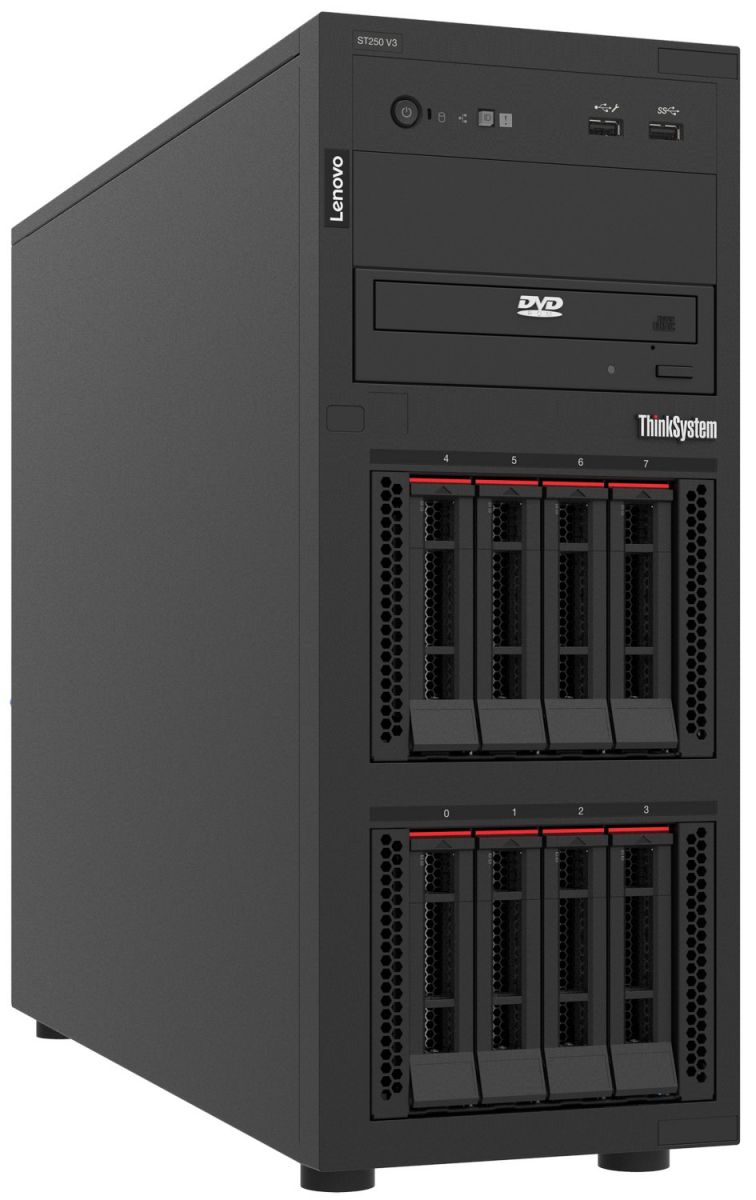

 Fast & Secure




Lenovo ThinkSystem ST250 V3 Overview
The Lenovo ThinkSystem ST250 V3 is a single-socket tower server built for organizations that need business-grade compute, storage, management and expansion capability without immediately moving to a larger dual-socket platform.
It sits between Lenovo’s entry-level tower systems and the considerably more expandable ST650 V3. This makes the ST250 V3 particularly relevant to growing companies, branch offices, remote sites, educational environments and business locations where a conventional data-center rack may not be available.
The server can operate as a standalone tower or be installed in a rack using the appropriate rack-mount hardware.
Depending on configuration, the ST250 V3 can support workloads including file services, business applications, infrastructure services, backup, databases, ERP or CRM applications and selected virtualization environments.
Choosing the correct configuration is more important than simply choosing the model name. Processor, memory, drive architecture, RAID, networking, power redundancy and future growth should all be evaluated before requesting a quotation.
Lenovo ST250 V3 Key Features
The ST250 V3 combines a compact tower format with capabilities normally associated with dedicated business server platforms.
Key platform characteristics include:
- single-socket Intel server processor architecture;
- Intel Xeon 6300 and Xeon E-2400 processor support;
- DDR5 ECC memory;
- up to 128 GB of system memory depending on configuration;
- multiple 2.5-inch and 3.5-inch storage configurations;
- SAS and SATA drive support;
- selected NVMe storage configurations;
- hardware RAID adapter support;
- four PCIe expansion slots;
- PCIe Gen5 connectivity;
- integrated Gigabit Ethernet;
- dedicated remote-management connectivity;
- Lenovo XClarity Controller 2;
- optional supported NVIDIA GPU configurations;
- fixed or redundant power-supply options depending on configuration;
- tower deployment with rack-conversion capability.
These features make the ST250 V3 more flexible than a basic office server, particularly where storage expansion, resilience or remote management matters.
Processor and Performance
The ThinkSystem ST250 V3 is a one-socket server.
Current configurations can use Intel Xeon 6300-series or Intel Xeon E-2400-series processors. The supported processor range allows buyers to select a CPU according to application demand instead of paying for processing resources the workload does not need.
Processor selection should consider:
- application type;
- active users;
- expected CPU utilization;
- database requirements;
- number of virtual machines;
- software licensing;
- future workload growth.
A file server with moderate user activity may have very different CPU requirements from an application server supporting a transactional database.
Before choosing a higher-core processor, confirm whether the software benefits from additional cores and whether licensing is calculated per processor or core.
Memory and Scalability
The ST250 V3 supports DDR5 ECC UDIMM memory with four DIMM slots and a maximum supported capacity of up to 128 GB, depending on the configuration.
ECC memory is particularly relevant for business servers because it provides error-correction capabilities intended to improve data integrity compared with ordinary desktop-class memory.
Memory requirements should be calculated from actual workload demand.
For example, a simple file service may require relatively modest RAM, whereas:
- database applications;
- ERP platforms;
- virtualization;
- development environments;
- multiple simultaneous business applications
can consume considerably more.
For virtualization, calculate memory for the host operating environment plus every planned virtual machine and retain reasonable headroom for growth.
Storage and RAID Options
Storage is one of the strongest reasons to choose the ST250 V3 over a smaller entry-level tower server.
The platform supports several chassis and drive-bay configurations, including combinations of 2.5-inch and 3.5-inch drives.
Depending on the selected chassis and controller, options can include:
- SAS HDDs;
- SATA HDDs;
- SATA SSDs;
- selected NVMe configurations;
- M.2 boot storage;
- hot-swap drives;
- simple-swap drives.
A buyer should not select storage simply from total terabytes.
The correct design depends on:
Capacity — how much usable storage is required?
Performance — what read/write performance does the application need?
Redundancy — how much drive-failure tolerance is required?
Growth — how quickly is the data increasing?
Recovery — how will data be restored after a failure, corruption or ransomware incident?
The ST250 V3 supports both onboard SATA functionality and dedicated RAID/HBA options depending on the required configuration.
For production workloads, define the RAID requirement before ordering so that the correct controller and drives can be included in the bill of materials.
RAID is not a replacement for backup.
Networking and PCIe Expansion
The ST250 V3 includes integrated Gigabit Ethernet interfaces and a dedicated management connection.
Four PCIe slots provide room for supported expansion devices, with PCIe Gen5 available on one slot.
Additional adapters may be required where the deployment needs:
- higher-speed network connectivity;
- additional Ethernet interfaces;
- dedicated storage connectivity;
- supported GPU capability;
- specialized I/O.
Network requirements should be considered together with the existing switch infrastructure.
Installing a faster network adapter offers little value if the rest of the network cannot support the required throughput.
Lenovo XClarity Server Management
The ST250 V3 includes Lenovo XClarity Controller 2 for systems management.
Remote-management functionality is particularly valuable when a server is installed in a branch office or other site without dedicated technical staff.
Depending on licensing and management architecture, Lenovo XClarity tools can help IT teams monitor hardware status, manage firmware, receive alerts and administer Lenovo infrastructure centrally.
For organizations operating several ThinkSystem servers across different sites, centralized management can reduce the need to physically visit each server for routine administration.
Security and Reliability
Business server security starts below the operating-system layer.
The ST250 V3 platform includes features such as TPM 2.0 support, firmware security controls and password protection, with additional physical-security options available depending on configuration.
Buyers should consider server security as part of a wider infrastructure policy covering:
- operating-system hardening;
- firmware updates;
- administrative access;
- network segmentation;
- encryption;
- backup;
- physical access;
- monitoring.
If the server will be installed in an open office or branch location rather than a controlled server room, physical-security requirements deserve additional attention.
What Workloads Is the Lenovo ST250 V3 Designed For?
File and Business Applications
The ST250 V3 can be configured for centralized file storage, document access and common business applications.
Storage layout may be more important than CPU performance in these deployments.
Consider drive reliability, RAID, backup and network throughput before simply selecting the highest processor.
Branch and Remote Office Infrastructure
A branch location may need local server services without having the space or operational requirement for a complete server rack.
The ST250 V3’s tower format and remote-management capabilities make it relevant to these environments.
Possible applications include:
- directory services;
- local file services;
- business applications;
- backup targets;
- infrastructure services;
- branch-specific databases.
ERP and CRM Applications
ERP and CRM systems vary considerably in resource demand.
Before selecting the ST250 V3 for an ERP or CRM workload, confirm the software vendor’s CPU, memory, database, storage and operating-system requirements.
The ST250 V3 can be a practical platform for appropriate small and mid-sized deployments, but demanding enterprise installations may require a larger platform.
Databases
Database performance depends on more than processor speed.
Memory capacity, storage latency, RAID architecture and application design can all have a significant effect.
Small and moderate database workloads may fit the ST250 V3 well when properly configured.
Very large, memory-intensive or highly transactional databases should be sized carefully and may justify a higher-end server.
Backup and Storage
The platform’s flexible drive options can make it useful for selected backup or storage-oriented roles.
However, the server should not be treated as the entire backup strategy.
A proper backup design should consider:
- retention;
- offsite copies;
- immutable storage where required;
- restore testing;
- ransomware protection;
- recovery objectives.
Development and Testing
The ST250 V3 can also provide a useful dedicated environment for software development, testing or lab workloads where a team needs server-class hardware without deploying a high-density rack system.
Is the Lenovo ST250 V3 Good for Virtualization?
Yes, the Lenovo ThinkSystem ST250 V3 can support virtualization, provided the processor, memory, storage controller, RAID architecture and hypervisor are correctly selected.
The important question is not simply whether the server supports VMware or Hyper-V.
The real questions are:
- How many virtual machines will run?
- How much RAM will each VM require?
- How much CPU will be allocated?
- What storage IOPS are required?
- Which RAID controller will be used?
- How fast must the network be?
- How much capacity will be needed next year?
One particularly important configuration point is storage-controller compatibility.
Do not assume every onboard software RAID mode is appropriate for every hypervisor. If virtualization is a key workload, specify the intended hypervisor during quotation so that the storage and controller configuration can be validated.
For larger VM counts, substantial memory requirements or high I/O demand, a more powerful platform such as the ST650 V3 or a Lenovo rack server may be more suitable.
How to Configure a Lenovo ST250 V3
Processor
Choose the processor according to application demand rather than model hierarchy alone.
Provide:
- application names;
- active users;
- current CPU utilization where known;
- virtualization requirements;
- software licensing constraints.
Memory
Calculate RAM from the application, database and virtual-machine requirements.
Avoid specifying only the minimum memory required today if the environment is expected to grow.
Storage
Choose drive technology according to workload.
HDDs can provide economical capacity.
SSDs can improve application and database responsiveness.
NVMe may be useful where supported and where very low storage latency or higher throughput is genuinely required.
RAID
Determine whether the priority is:
- usable capacity;
- write performance;
- read performance;
- drive-failure tolerance;
- rebuild resilience.
Then select the controller and RAID architecture accordingly.
Networking
Consider existing switch speeds, backup traffic, virtualization traffic and application demand.
Additional network adapters may be required if the integrated interfaces are not sufficient.
Power and Redundancy
Power redundancy matters more as application criticality increases.
The ST250 V3 can be configured with different power-supply arrangements, including redundant options in supported configurations.
If downtime caused by a power-supply failure would materially affect operations, include redundancy in the RFQ.
Growth
Server sizing should cover more than today’s workload.
Consider:
- increasing user count;
- expanding database size;
- additional applications;
- new virtual machines;
- larger backup sets;
- additional branch services.
A moderate amount of planned headroom can reduce the risk of replacing the server prematurely.
Lenovo ST50 V3 vs ST250 V3
The ST50 V3 and ST250 V3 share a similar one-socket processor and DDR5 memory foundation, but they target different expansion requirements.
The ST50 V3 is better suited to entry-level deployments where storage and expansion requirements are modest.
The ST250 V3 should be considered when the organization needs more drive flexibility, hot-swap options, stronger RAID choices, additional PCIe expansion or redundant power capability.
Choose ST50 V3 when:
- the workload is relatively light;
- storage requirements are modest;
- budget and footprint are primary concerns;
- extensive redundancy is not required.
Choose ST250 V3 when:
- storage requirements are growing;
- hot-swap drives are important;
- hardware RAID is required;
- more PCIe expansion is needed;
- power redundancy is desirable;
- the server will host several business services.
Lenovo ST250 V3 vs ST650 V3
The difference between the ST250 V3 and ST650 V3 is considerably larger.
The ST250 V3 remains a single-socket SMB and branch-oriented platform.
The ST650 V3 is a larger enterprise-class architecture designed for substantially greater CPU, memory, storage and I/O requirements.
Choose ST250 V3 when:
- one processor is sufficient;
- memory requirements fit within the ST250 platform;
- the workload is small to medium in scale;
- a cost-effective tower architecture is preferred.
Evaluate ST650 V3 when:
- two-socket capability is required;
- significantly more memory is needed;
- virtualization consolidation is substantial;
- storage requirements are much larger;
- multiple high-demand applications share the server;
- greater enterprise expansion is required.
Buying the larger server is not automatically better.
The correct platform is the one that meets the workload, resilience and growth requirements without unnecessary complexity.
Lenovo ST250 V3 for UAE & GCC Projects
Organizations sourcing the Lenovo ThinkSystem ST250 V3 in the UAE, Saudi Arabia or other GCC markets can provide NETSEG with their technical and commercial requirements for quotation.
For enquiries from Dubai, Abu Dhabi, Riyadh, Jeddah, Dammam, Qatar, Kuwait, Bahrain or Oman, include the final delivery location together with the required configuration and quantity.
Do not rely only on a generic ST250 V3 model name when comparing quotations.
Two ST250 V3 systems can differ significantly in:
- processor;
- memory;
- storage;
- RAID controller;
- power supply;
- networking;
- operating system;
- support terms.
Compare the complete bill of materials.
What to Include in Your ST250 V3 RFQ
For an accurate quotation, provide as much of the following as possible:
- processor requirement;
- required RAM;
- storage capacity;
- HDD, SSD or NVMe preference;
- RAID requirement;
- network-interface requirement;
- operating system or hypervisor;
- power redundancy requirement;
- quantity;
- delivery location;
- intended workload.
If you do not yet know the technical configuration, describe the workload instead.
NETSEG can use information such as applications, user count, current storage usage, virtual-machine requirements and expected growth as the basis for discussing an appropriate configuration.
Request Lenovo ST250 V3 Pricing
Planning a new business server, branch deployment or infrastructure refresh?
Contact NETSEG to discuss your Lenovo ThinkSystem ST250 V3 requirements and request configuration-based pricing for your UAE or GCC project.
Reviews
There are no reviews yet.