


 Fast & Secure




WS-C2960CX-8PC-L Overview
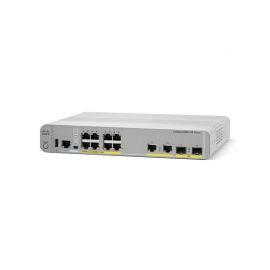
WS-C2960CX-8PC-L equips 8 Gigabit Ethernet POE+ ports with 2 x 1 Gigabit copper and 2 x 1 Gigabit SFP uplinks. The POE powers up to 30W/port and supplies total 124W POE budget which can power IP phones, IP Camother POE devices.
Quick Specs
Figure 1 shows the appearance of WS-C2960CX-8PC-L.
Table 1 shows the Quick Specs.
| Product Code | WS-C2960CX-8PC-L |
| Feature Set | LAN Base |
| Uplink Interfaces | 2 x 1G copper plus 2 x 1G SFP |
| Ports | 8 x 10/100/1000 Gigabit Ethernet ports |
| Available POE Power | 124W |
| Forwarding Bandwidth | 12 Gbps |
| Switching Bandwidth (full-duplex capacity) | 24 Gbps |
| RAM | 512 MB |
| Flash Memory | 128 MB |
| Dimensions | 4.44 x 26.9 x 23.8 cm |
| Package Weight | 4.65 Kg |
Product Details
Figure 2 shows the front panel of WS-C2960CX-8PC-L.
Note:
| Mode button | 8 x 10/100/1000 ports | ||
| USB Type A port | 2 x 1G copper | ||
| RJ-45 Console Port | SFP module slots | ||
| USB mini-Type B (console) port | LED Area |
Table 2 shows the four LEDs descriptions.
| LED | Color/Port Mode | Description |
| SYST (System LED) | Off | System is not powered on. |
| Green | System is operating normally. | |
| Amber | System is receiving power but is not operating properly. | |
| STAT | Port status | The port status. This is the default mode. |
| SPEED | Port speed | The port operating speed: 10, 100,1000 Mb/s. |
| POE | Off | PoE is not enabled. |
| Green | PoE is enabled. Ports are functioning correctly. | |
| Blinking Amber | -PoE mode is not selected -At least one of the 10/10010/100/100 PoE ports has been denied power -At least one of the ports has a PoE fault |
The console LEDs show which console port is in use.
If you connect a cable to a console port, the switch automatically uses that port for console communication. If you connect two console cables, the USB-mini console port has priority.
Table 3 shows the Console LED description.
| LED | Color | Description |
| RJ-45 console port | Green | RJ-45 console port is active. USB-mini console port LED is not active. |
| Off | Port is not active. USB-mini console port is active. | |
| USB-mini console port | Green | USB-mini console port is active. RJ-45 console port LED is not active. |
| Off | Port is not active. RJ-45 console port is active. |
The Accessories
Table 4 shows some recommended cables.
| Models | Descriptions |
| CAB-CONSOLE-USB | Cisco CAB-CONSOLE-USB Console Cable 6 ft with USB Type A and mini-B |
| CAB-CONSOLE-RJ45 | Cisco CAB-CONSOLE-RJ45 Console Cable 6ft with RJ45 and DB9F |
Compare to similar item
| Models | WS-C2960CX-8PC-L | WS-C2960CX-8TC-L |
| Uplinks | 2 x 1G copper2 x 1G SFP | 2 x 1G copper2 x 1G SFP |
| Ports | 8 x 10/100/1000 Gigabit Ethernet | 8 x 10/100/1000 Gigabit Ethernet |
| Feature set | LAN Base | LAN Base |
| Available POE Power | 124W | None |
Solution
How to use this product to build Network for Small Business (Requires Router & Voice Module)
See here:
SMB Network Options
Get more information
Do you have any question about the WS-C2960CX-8PC-L
Contact us now
orders@netseg.me.
Reviews
There are no reviews yet.